Connecting local databases - Part VII
In the previous post, we talked about docker compose with MongoDB and a Spring Boot application. Today I’m going to finish this series (amen!) with the PostgreSQL configuration.
Necessary configurations
I’ll skip the Dockerfile configuration because little changes, just the application name in the target.
Now I’ll go to docker-compose.yml, the pom.xml of the application itself and the application.properties.
docker-compose.yml:
1
2
3
4
5
6
7
8
9
10
11
12
13
14
15
16
17
18
19
20
21
22
23
24
25
26
27
28
29
30
31
version: '3.9'

services:
  postgres_application:
    container_name: postgres_application
    image: postgres
    volumes:
      - postgres_data:/var/lib/postgresql/data
    environment:
      POSTGRES_DB: orderdb
      POSTGRES_USER: postgres
      POSTGRES_PASSWORD: admin
    ports:
      - "5432:5432"

  delivery_management_api:
    build: .
    ports:
      - "8080:8080"
    depends_on:
      - postgres_application
    environment:
      - SPRING_DATASOURCE_URL=jdbc:postgresql://postgres_application:5432/orderdb
      - SPRING_DATASOURCE_USERNAME=postgres
      - SPRING_DATASOURCE_PASSWORD=admin

volumes:
  postgres_data:

networks:
  app-network:
- Version: Specifies the version of the Docker Compose syntax you’re using. Version 3.9 is one of the most recent versions, offering support for many features, such as networks and volumes.
- Services: This section defines the containers that will be run. Each container is an instance of a service.
postgres_application Service:
image: Specifies the Docker image to be used.
ports: Maps the container ports to the host machine ports. “5432:5432” means that port 5432 of the container (postgres default) will be accessible on port 5432 of the host. This allows you to access postgres from outside the container, for example, using a postgres client.
volumes: Maps a Docker volume, which allows data persistence. postgres_data:/var/lib/postgresql/data indicates that the volume called postgres_data will be used to store MongoDB data in the /var/lib/postgresql/data directory inside the container. This means that even if the container is destroyed, the data persists in the volume.
environment: defines the database access configurations with user and password and the name of the database that will be created/used
Application Service:
delivery_management_api: Service name for your application.
build: Indicates that the container should be built from the Dockerfile located in the current directory (.). The Dockerfile must be in the same directory where docker-compose.yml is located.
ports: Similar to the postgres service, “8080:8080” maps port 8080 of the container to port 8080 of the host. This allows you to access your application through the URL http://localhost:8080.
depends_on: Specifies that the delivery_management_api service depends on the postgres service. This ensures that postgres is started before the application. However, this doesn’t guarantee that postgres is fully ready to accept connections when the application starts.
environment: Defines environment variables for the container. These variables are passed to the application environment and can be used for configuration.
SPRING_DATASOURCE_URL: is used to configure the Spring application connection with a PostgreSQL database.
I’ll explain the item above:
- jdbc: Java Database Connectivity (JDBC) is a Java API that allows interactions with different databases;
- postgresql: the type of database used;
//: separator that indicates the beginning of the part that contains information about the host and port;- the rest of the information contained in the string of this URL are: the port used by postgres, the service name and the database name.
Volumes and networks:
Volumes: Defines the volumes used by the services. Here, postgres_data is a volume that will be used by the postgres service to persist data. By creating a named volume, you can easily manage it and it will persist even if the containers are removed.
Networks (optional): This section is optional and allows you to define custom networks to connect the services. If you define a network here, the services can communicate with each other using their names. In your example, there is no network defined.
The application’s pom.xml needs to be adequate to provide structure to run the way we defined.
1
2
3
4
5
6
7
8
9
10
11
12
13
14
15
16
17
18
19
20
21
22
23
24
25
26
27
28
29
30
31
32
33
34
35
36
37
38
39
40
41
42
43
44
45
46
47
48
49
50
51
52
53
54
55
56
57
58
59
60
61
62
63
64
65
66
67
68
69
70
71
72
73
74
75
76
77
78
79
80
81
82
83
84
85
86
87
88
89
90
91
92
93
94
95
<?xml version="1.0" encoding="UTF-8"?>
<project xmlns="http://maven.apache.org/POM/4.0.0"
         xmlns:xsi="http://www.w3.org/2001/XMLSchema-instance"
         xsi:schemaLocation="http://maven.apache.org/POM/4.0.0 http://maven.apache.org/xsd/maven-4.0.0.xsd">
    <modelVersion>4.0.0</modelVersion>

    <groupId>org.danielmesquita</groupId>
    <artifactId>delivery-management-api</artifactId>
    <version>1.0-SNAPSHOT</version>

    <properties>
        <maven.compiler.source>17</maven.compiler.source>
        <maven.compiler.target>17</maven.compiler.target>
        <project.build.sourceEncoding>UTF-8</project.build.sourceEncoding>
        <spring.boot.version>3.3.3</spring.boot.version>
    </properties>

    <dependencyManagement>
        <dependencies>
            <dependency>
                <groupId>org.springframework.boot</groupId>
                <artifactId>spring-boot-dependencies</artifactId>
                <version>${spring.boot.version}</version>
                <type>pom</type>
                <scope>import</scope>
            </dependency>
        </dependencies>
    </dependencyManagement>

    <dependencies>
        <dependency>
            <groupId>org.postgresql</groupId>
            <artifactId>postgresql</artifactId>
            <scope>runtime</scope>
        </dependency>
        <dependency>
            <groupId>org.springframework.boot</groupId>
            <artifactId>spring-boot-starter-web</artifactId>
        </dependency>
        <dependency>
            <groupId>org.springframework.boot</groupId>
            <artifactId>spring-boot-starter-data-jpa</artifactId>
        </dependency>
        <dependency>
            <groupId>javax.validation</groupId>
            <artifactId>validation-api</artifactId>
            <version>2.0.1.Final</version>
        </dependency>
        <dependency>
            <groupId>org.projectlombok</groupId>
            <artifactId>lombok</artifactId>
            <optional>true</optional>
        </dependency>
    </dependencies>

    <build>
        <plugins>
            <plugin>
                <groupId>org.springframework.boot</groupId>
                <artifactId>spring-boot-maven-plugin</artifactId>
                <executions>
                    <execution>
                        <goals>
                            <goal>repackage</goal>
                        </goals>
                    </execution>
                </executions>
            </plugin>
            <plugin>
                <groupId>org.apache.maven.plugins</groupId>
                <artifactId>maven-jar-plugin</artifactId>
                <version>3.4.2</version> <!-- Certifique-se de usar uma versão compatível -->
                <configuration>
                    <archive>
                        <manifest>
                            <mainClass>org.danielmesquita.Application</mainClass> <!-- Defina a sua classe principal -->
                        </manifest>
                    </archive>
                </configuration>
            </plugin>
            <plugin>
                <groupId>org.apache.maven.plugins</groupId>
                <artifactId>maven-compiler-plugin</artifactId>
                <version>3.13.0</version>
                <configuration>
                    <source>17</source>
                    <target>17</target>
                    <compilerArgs>
                        <arg>-parameters</arg>
                    </compilerArgs>
                </configuration>
            </plugin>
        </plugins>
    </build>
</project>
I basically kept the same structure of the previous pom.xml. But in this one I needed to change the database dependency and also include the spring-boot-starter-data-jpa dependency, which includes Hibernate and other JPA (Java Persistence API) utilities, which are necessary for data persistence of Java entities in PostgreSQL. With Hibernate and JPA, we can interact with the PostgreSQL database without needing to write manual SQL queries.
Hibernate is an ORM (Object-Relational Mapping) framework that Spring Boot uses to interact with databases. With it you can work with Java objects, while it maps the objects to database tables, managing SQL queries behind the scenes.
Another inclusion I made was in the build plugins, I included the maven-compiler-plugin with the -parameters flag in the compiler configuration to be able to use some parameters in the request urls.
Lastly in the configuration part, the application.properties:
1
2
3
4
5
6
7
8
9
10
11
12
13
14
15
# Configuração do PostgreSQL
spring.datasource.url=jdbc:postgresql://postgres_application:5432/orderdb
spring.datasource.driver-class-name=org.postgresql.Driver
spring.datasource.username=postgres
spring.datasource.password=admin

# Dialeto do PostgreSQL para o Hibernate
spring.jpa.database-platform=org.hibernate.dialect.PostgreSQLDialect

# Inicialização do banco de dados
spring.sql.init.mode=always
spring.jpa.defer-datasource-initialization=true

# Atualiza o esquema do banco de dados com base nas entidades sempre que a aplicação for iniciada
spring.jpa.hibernate.ddl-auto=update
I left each block commented to make it clearer and facilitate understanding.
The .properties file is necessary in some applications to configure properties and behaviors that can be accessed throughout the application.
Once this is done, now let’s go to the application code and interactions with the database.
In the MongoDB application I created just one entity for understanding purposes. Since it was SQL, and in SQL we have some relationships between tables that are very useful to learn, I added a bit more, having 3 entities: Product, Order, Category.
It’s basically a structure where we’ll have products, which are in a certain category and which can be included in orders.
Entities and their characteristics
Now I’ll share the entities.
Product:
1
2
3
4
5
6
7
8
9
10
11
12
13
14
15
16
17
18
19
20
21
22
23
24
25
26
27
28
29
30
31
32
33
@Entity
@Table(name = "products")
@Data
@Builder
@ToString(exclude = "orders")
@EqualsAndHashCode(exclude = "orders")
@NoArgsConstructor
@AllArgsConstructor
public class Product {
  @Id
  @GeneratedValue(strategy = GenerationType.IDENTITY)
  @Column(name = "product_id")
  private Long id;

  @Column(name = "product_name")
  private String name;

  @Column(name = "product_price")
  private Double price;

  @ManyToOne
  @JoinColumn(name = "category_id", nullable = false)
  @JsonBackReference
  private Category category;

  @ManyToMany
  @JoinTable(
      name = "item_order",
      joinColumns = @JoinColumn(name = "product_id"),
      inverseJoinColumns = @JoinColumn(name = "order_id"))
  @JsonIgnore
  Set<Order> orders;
}
Category
1
2
3
4
5
6
7
8
9
10
11
12
13
14
15
16
17
18
19
20
21
22
23
24
25
26
import com.fasterxml.jackson.annotation.JsonManagedReference;
import jakarta.persistence.*;
import java.util.List;
import lombok.*;

@Entity
@Table(name = "category")
@Data
@Builder
@ToString(exclude = "products")
@EqualsAndHashCode(exclude = "products")
@NoArgsConstructor
@AllArgsConstructor
public class Category {
  @Id
  @GeneratedValue(strategy = GenerationType.IDENTITY)
  @Column(name = "category_id")
  private Long id;

  @Column(name = "category_name", nullable = false)
  private String categoryName;

  @OneToMany(mappedBy = "category", fetch = FetchType.LAZY)
  @JsonManagedReference
  private List<Product> products;
}
Order
1
2
3
4
5
6
7
8
9
10
11
12
13
14
15
16
17
18
19
20
21
22
23
24
import jakarta.persistence.*;
import java.time.LocalDateTime;
import java.util.List;
import lombok.*;

@Entity
@Table(name = "orders")
@Data
@Builder
@ToString(exclude = "products")
@EqualsAndHashCode(exclude = "products")
@NoArgsConstructor
@AllArgsConstructor
public class Order {
  @Id
  @GeneratedValue(strategy = GenerationType.IDENTITY)
  @Column(name = "order_id")
  private Long id;

  @Column(name = "order_date")
  private LocalDateTime orderDate;

  @ManyToMany List<Product> products;
}
You saw that it’s full of annotations in these entities. Here we have some annotations referring to JPA and also to Lombok. As in the last posts, I showed all the manipulation and reading methods for an entity, here I’ll use the Lombok library to reduce repetitive code. I’ll explain each annotation:
@Entity: Indicates that the class is a JPA (Java Persistence API) entity that represents a table in the database.@Table(name = "category"): Specifies the name of the table in the database that this entity represents.@Data: A Lombok annotation that automatically generates getter, setter, toString, equals, and hashCode methods for the class.@Builder: Allows use of the Builder design pattern to create entity instances in a more readable way.@ToString(exclude = "products"): Generates the toString method, but excludes the products attribute to avoid an infinite loop due to the bidirectional relationship.@EqualsAndHashCode(exclude = “products”): Generates equals and hashCode methods, but excludes the products attribute to avoid circular comparison problems.@NoArgsConstructor: Generates a constructor with no arguments. Necessary for JPA to create class instances.@AllArgsConstructor: Generates a constructor that accepts all class fields as parameters.@Id: Indicates that the id field is the entity’s primary key. Unlike MongoDB, this field cannot be a String.@GeneratedValue(strategy = GenerationType.IDENTITY): Specifies that the primary key value will be generated by the database (normally in an auto-increment column).@Column(name = "category_id"): Maps the id field to the category_id column in the table. Also applies to other entities.@Column(name = "category_name", nullable = false): Maps the categoryName field to the category_name column, indicating that it cannot be null.@OneToMany(mappedBy = "category"): Defines a one-to-many relationship with the Product entity. The mappedBy attribute indicates that the “many” side (i.e., Product) has the foreign key.@ManyToMany: Defines a many-to-many relationship with another entity. In the case of this application, it means that an order can contain many products and a product can be in many orders.@ManyToOne: Defines a many-to-one relationship with another entity. In our case, it means that many products can belong to a single category.@JsonManagedReference: Used in bidirectional relationships, indicates that this is the “managed” side of the reference. During JSON serialization, the “managed” side is included, while the “back” side (referenced in the other entity) will be ignored, in this case, in the Product entity.@JsonBackReference: Used in a bidirectional relationship, indicates that this is the “back” side of the reference. During JSON serialization, the “back” side will be ignored, avoiding infinite loops.@JoinColumn(name = "category_id", nullable = false): Specifies the column that stores the foreign key (in this case, category_id is the foreign key referring to the products table).@JoinTable(...): Specifies the junction table that relates products to orders. The joinColumns defines the foreign key of the Product entity, while inverseJoinColumns defines the foreign key of the Order entity.@JsonIgnore: Indicates that this field should not be included in JSON serialization. It’s useful to avoid including data that is not necessary or can cause infinite loops in serialization.
Relationships Summary
ORM (Object Relational Mapper) is an object-relational mapping technique that brings object-oriented application development closer to the relational database paradigm (SQL). Generally you can see these relationships represented by a diagram using UML like the item below:
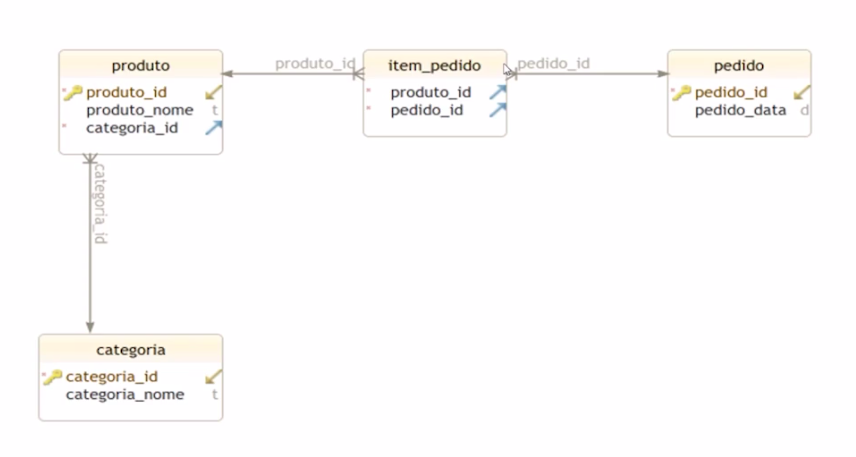
Category to Product: One-to-many relationship. A category can have many products, but a product can only belong to one category.
Order to Product: Many-to-many relationship. An order can contain many products, and a product can be part of many orders.
Product to Category: Many-to-one relationship. Many products can belong to a single category.
Product to Order: Many-to-many relationship. Many products can be associated with many orders.
Repository
We don’t have many considerable differences in the repositories of this application compared to Mongo. The main difference is that instead of extending MongoRepository, it will extend JpaRepository, as in the example below:
1
2
3
4
@Repository
public interface CategoryRepository extends JpaRepository<Category, Long> {
  Optional<Category> findByCategoryName(String categoryName);
}
In the repository above, referring to the Category entity, I’m extending JpaRepository for Category and Long (referring to the item’s primary key). Additionally, I’m inserting a custom method to search for the category by name. The other repositories follow the same structure.
Service
The service also doesn’t have much relevant change compared to the case used in the application using NoSQL because the business rule hasn’t changed.
1
2
3
4
5
6
7
8
9
10
11
12
13
14
15
16
17
18
19
20
21
22
23
24
25
26
27
28
29
30
31
import java.util.List;
import java.util.Optional;
import org.danielmesquita.entities.Category;
import org.danielmesquita.repository.CategoryRepository;
import org.springframework.beans.factory.annotation.Autowired;
import org.springframework.stereotype.Service;

@Service
public class CategoryService {
  @Autowired CategoryRepository categoryRepository;

  public List<Category> findAllCategories() {
    return categoryRepository.findAll();
  }

  public Optional<Category> findCategoryById(Long id) {
    return categoryRepository.findById(id);
  }

  public Optional<Category> findCategoryByName(String categoryName) {
    return categoryRepository.findByCategoryName(categoryName);
  }

  public void insertCategory(Category category) {
    categoryRepository.save(category);
  }

  public void deleteCategoryById(Long id) {
    categoryRepository.deleteById(id);
  }
}
A point worth mentioning is that we use Optional to avoid NullPointerException if the item is not in the database.
Controller
In this part, we have some differences compared to the NoSQL application just so we can better explore the relationship between entities. Below I’ll show how each one turned out.
ProductController
1
2
3
4
5
6
7
8
9
10
11
12
13
14
15
16
17
18
19
20
21
22
23
24
25
26
27
28
29
30
31
32
33
34
35
36
37
38
39
40
41
42
43
44
45
46
47
48
49
50
51
52
53
54
55
56
57
58
59
60
61
62
63
64
65
66
import java.util.List;
import java.util.Optional;
import org.danielmesquita.dto.ProductDTO;
import org.danielmesquita.entities.Category;
import org.danielmesquita.entities.Product;
import org.danielmesquita.service.CategoryService;
import org.danielmesquita.service.ProductService;
import org.springframework.beans.factory.annotation.Autowired;
import org.springframework.http.HttpStatus;
import org.springframework.http.ResponseEntity;
import org.springframework.web.bind.annotation.*;
import org.springframework.web.server.ResponseStatusException;

@RestController
@RequestMapping("/products")
public class ProductController {

  @Autowired private ProductService productService;
  @Autowired private CategoryService categoryService;

  @PostMapping
  public ResponseEntity<Product> createProduct(@RequestBody ProductDTO productDTO) {
    Category category =
        categoryService
            .findCategoryByName(productDTO.getCategory())
            .orElseThrow(
                () -> new ResponseStatusException(HttpStatus.NOT_FOUND, "Category not found"));

    Product product =
        Product.builder()
            .name(productDTO.getName())
            .price(productDTO.getPrice())
            .category(category)
            .build();

    productService.insertProduct(product);

    return new ResponseEntity<>(product, HttpStatus.CREATED);
  }

  @GetMapping
  public ResponseEntity<List<Product>> getAllProducts() {
    List<Product> products = productService.findAllProducts();
    return new ResponseEntity<>(products, HttpStatus.OK);
  }

  @GetMapping("/{id}")
  public ResponseEntity<Product> getProductById(@PathVariable Long id) {
    Optional<Product> product = productService.findProductById(id);
    return product.map(ResponseEntity::ok).orElseGet(() -> ResponseEntity.notFound().build());
  }

  @PutMapping("/{id}")
  public ResponseEntity<Product> updateProduct(
      @PathVariable Long id, @RequestBody Product product) {
    product.setId(id);
    productService.updateProduct(product);
    return new ResponseEntity<>(product, HttpStatus.OK);
  }

  @DeleteMapping("/{id}")
  public ResponseEntity<Void> deleteProduct(@PathVariable Long id) {
    productService.deleteProduct(id);
    return new ResponseEntity<>(HttpStatus.NO_CONTENT);
  }
}
CategoryController
1
2
3
4
5
6
7
8
9
10
11
12
13
14
15
16
17
18
19
20
21
22
23
24
25
26
27
28
29
30
31
32
33
34
35
36
37
38
39
40
41
42
43
44
45
46
47
48
49
50
51
52
53
54
55
56
57
58
59
60
61
62
63
64
65
66
67
68
69
70
71
72
73
74
75
76
77
78
79
80
81
82
83
84
85
86
87
88
89
90
91
92
93
94
95
import java.util.ArrayList;
import java.util.List;
import java.util.Optional;
import org.danielmesquita.dto.CategoryDTO;
import org.danielmesquita.entities.Category;
import org.danielmesquita.entities.Product;
import org.danielmesquita.service.CategoryService;
import org.danielmesquita.service.ProductService;
import org.springframework.beans.factory.annotation.Autowired;
import org.springframework.http.HttpStatus;
import org.springframework.http.ResponseEntity;
import org.springframework.web.bind.annotation.*;
import org.springframework.web.server.ResponseStatusException;

@RestController
@RequestMapping("/categories")
public class CategoryController {

  @Autowired private CategoryService categoryService;
  @Autowired private ProductService productService;

  @PostMapping
  public ResponseEntity<Category> createCategory(@RequestBody CategoryDTO categoryDTO) {
    List<Product> products = populateProductList(categoryDTO);

    Category category =
        Category.builder()
            .categoryName(categoryDTO.getName())
            .products(setProductsListToBuild(products))
            .build();

    categoryService.insertCategory(category);

    return new ResponseEntity<>(category, HttpStatus.CREATED);
  }

  @GetMapping
  public ResponseEntity<List<Category>> getAllCategories() {
    List<Category> categories = categoryService.findAllCategories();
    return new ResponseEntity<>(categories, HttpStatus.OK);
  }

  @GetMapping("/{id}")
  public ResponseEntity<Category> getCategoryById(@PathVariable Long id) {
    Optional<Category> category = categoryService.findCategoryById(id);
    return category.map(ResponseEntity::ok).orElseGet(() -> ResponseEntity.notFound().build());
  }

  @PutMapping("/{id}")
  public ResponseEntity<Category> updateCategory(
      @PathVariable Long id, @RequestBody Category categoryDetails) {
    Optional<Category> category = categoryService.findCategoryById(id);
    if (category.isPresent()) {
      Category existingCategory = category.get();
      existingCategory.setCategoryName(categoryDetails.getCategoryName());
      categoryService.insertCategory(existingCategory);
      return new ResponseEntity<>(existingCategory, HttpStatus.OK);
    } else {
      return new ResponseEntity<>(HttpStatus.NOT_FOUND);
    }
  }

  @DeleteMapping("/{id}")
  public ResponseEntity<Void> deleteCategory(@PathVariable Long id) {
    categoryService.deleteCategoryById(id);
    return new ResponseEntity<>(HttpStatus.NO_CONTENT);
  }

  public List<Product> populateProductList(CategoryDTO categoryDTO) {
    List<Product> products = new ArrayList<>();

    if (categoryDTO.getProductIdList() != null && !categoryDTO.getProductIdList().isEmpty()) {
      for (Long productId : categoryDTO.getProductIdList()) {
        Product product =
            productService
                .findProductById(productId)
                .orElseThrow(
                    () ->
                        new ResponseStatusException(
                            HttpStatus.NOT_FOUND, "Product with ID " + productId + " not found"));
        products.add(product);
      }
    }

    return products;
  }

  public List<Product> setProductsListToBuild(List<Product> products) {
    if (products.isEmpty()) {
      return null;
    }

    return products;
  }
}
OrderController
1
2
3
4
5
6
7
8
9
10
11
12
13
14
15
16
17
18
19
20
21
22
23
24
25
26
27
28
29
30
31
32
33
34
35
36
37
38
39
40
41
42
43
44
45
46
47
48
49
50
51
52
53
54
55
56
57
58
59
60
61
62
63
64
65
66
67
68
69
70
71
72
73
74
75
76
77
78
79
80
81
82
83
84
85
import java.util.ArrayList;
import java.util.List;
import java.util.Optional;
import org.danielmesquita.dto.OrderDTO;
import org.danielmesquita.entities.Order;
import org.danielmesquita.entities.Product;
import org.danielmesquita.service.OrderService;
import org.danielmesquita.service.ProductService;
import org.springframework.beans.factory.annotation.Autowired;
import org.springframework.http.HttpStatus;
import org.springframework.http.ResponseEntity;
import org.springframework.web.bind.annotation.*;
import org.springframework.web.server.ResponseStatusException;

@RestController
@RequestMapping("/orders")
public class OrderController {

  @Autowired private OrderService orderService;
  @Autowired private ProductService productService;

  @PostMapping
  public ResponseEntity<Order> createNewOrder(@RequestBody OrderDTO orderDTO) {
    if (orderDTO.getProductIdList() == null) {
      throw new ResponseStatusException(HttpStatus.BAD_REQUEST, "Product list cannot be empty");
    }

    List<Product> products = populateProductList(orderDTO);

    Order order = Order.builder().orderDate(orderDTO.getDate()).products(products).build();

    orderService.insertOrder(order);

    return new ResponseEntity<>(order, HttpStatus.CREATED);
  }

  @GetMapping
  public ResponseEntity<List<Order>> getAllOrders() {
    List<Order> orders = orderService.findAllOrders();
    return new ResponseEntity<>(orders, HttpStatus.OK);
  }

  @PutMapping("/{id}")
  public ResponseEntity<Order> updateOrder(
      @PathVariable Long id, @RequestBody OrderDTO orderDetails) {
    Optional<Order> order = orderService.findOrderById(id);
    if (order.isPresent()) {
      Order existingOrder = order.get();
      existingOrder.setOrderDate(orderDetails.getDate());

      List<Product> products = populateProductList(orderDetails);
      existingOrder.setProducts(products);

      orderService.insertOrder(existingOrder);
      return new ResponseEntity<>(existingOrder, HttpStatus.OK);
    } else {
      return new ResponseEntity<>(HttpStatus.NOT_FOUND);
    }
  }

  @DeleteMapping("/{id}")
  public ResponseEntity<Void> deleteOrder(@PathVariable Long id) {
    orderService.deleteOrderById(id);
    return new ResponseEntity<>(HttpStatus.NO_CONTENT);
  }

  public List<Product> populateProductList(OrderDTO orderDTO) {
    List<Product> products = new ArrayList<>();

    if (!orderDTO.getProductIdList().isEmpty()) {
      for (Long productId : orderDTO.getProductIdList()) {
        Product product =
            productService
                .findProductById(productId)
                .orElseThrow(
                    () ->
                        new ResponseStatusException(
                            HttpStatus.NOT_FOUND, "Product with ID " + productId + " not found"));
        products.add(product);
      }
    }

    return products;
  }
}
The annotations referring to Spring Boot for the controller remain, if you have questions, check the previous post. The main point is that here I included DTOs (data transfer objects) to optimize requests, avoiding the need to include all information from all objects that entities form. Additionally, these DTOs facilitate building the relationship between entities using only the necessary data.
A good programming practice in this case would be to remove data manipulations, especially of other entities, from controllers and send to services. The service classes should contain business rules, so if a category will include products or not, how the interactions between data from one entity and another will be done, should go there. I left it here more to show the idea of how it works.
In the GitHub repository of this application, I’ll leave it as I would refactor this code I showed here.
After that just run a docker-compose down -v to bring down the container and delete all data persisted in the database to start from scratch (if you don’t want to delete the data, just remove the -v from the command), then mvn clean install to install everything you need and run a docker-compose up --build and you can play with your application making HTTP requests via command line or using a tool like postman.
That’s it, this one was a denser post because there are some important concepts of JPA and SQL that needed to be refined and I wasn’t going to make a new one to break the train of thought. I’ll leave here below the links to the GitHub repositories of the applications I built in this series for those interested in looking at the code, if you want to clone, improve, open an issue…
Java application with MongoDB running locally Java application with PostgreSQL running locally Spring Boot application with MongoDB running via docker compose Spring Boot application with PostgreSQL running via docker compose
I hope whoever reads these posts (if anyone reads) makes good use of it. For me it was very good to learn, test and practice some things.
Cheers!
Comments powered by Disqus.